Search This Blog

Friday, 13 January 2017

Nokia 6 Price, Launch Date Revealed. Android Smartphones 2017

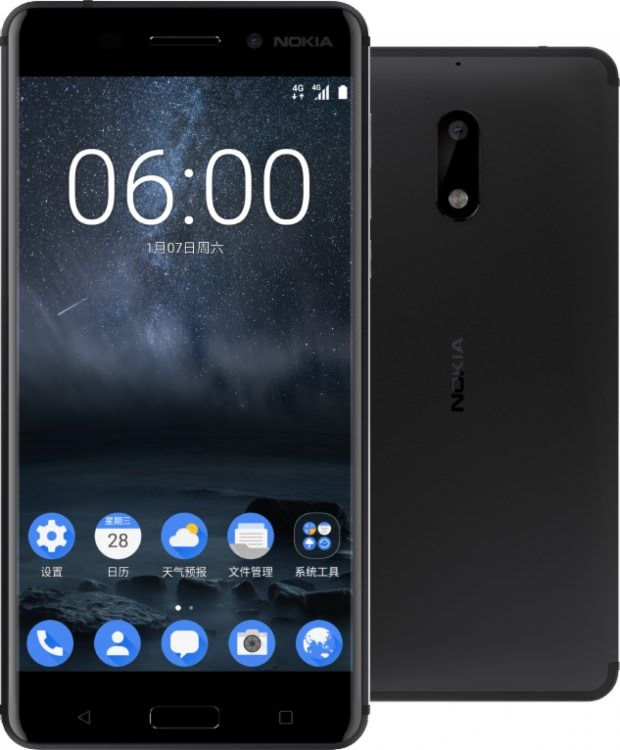
The first of the much-anticipated Nokia Android phones, the Nokia 6, was unveiled earlier this month without much fanfare exclusively in China. The new Nokia 6 smartphone will be going on sale next week in the country, the company said in a Facebook post.
"Get ready! The Nokia 6 is coming to China! More announcements to follow on February 26th... Save the date!", the post said.
February 26 is a day before the Mobile World Congress starts in Barcelona, so we can expect HMD Global, the new custodians of the Nokia brand, to unveil more Nokia Android phones for markets other than China at the event.
Additionally, JD.com, the retail partner for the first Nokia Android phone in China, kicked off registrations for the smartphone in China for its first Nokia 6 sale on January 19. Priced at CNY 1,699 (approximately Rs. 17,000), the Nokia 6 will be going on sale in just Black colour. A Nokia 6 Silver colour variant was spotted in the meanwhile, however, on Chinese telecommunications certification site TENAA. HMD Global had earlier confirmed that the new Nokia 6 smartphone will be exclusive to the Chinese market.


Image result for nokia 6

NETWORKTechnologyGSM / CDMA / HSPA / EVDO / LTE
LAUNCHAnnounced2017, January
StatusComing soon. Exp. release 2017, January 19th
BODYDimensions154 x 75.8 x 8.4 mm (6.06 x 2.98 x 0.33 in)
Weight169 g (5.96 oz)
SIMDual SIM (Nano-SIM, dual stand-by)
DISPLAYTypeIPS LCD capacitive touchscreen, 16M colors
Size5.5 inches (~70.7% screen-to-body ratio)
Resolution1080 x 1920 pixels (~403 ppi pixel density)
MultitouchYes
ProtectionCorning Gorilla Glass 3
PLATFORMOSAndroid OS, v7.0 (Nougat)
ChipsetQualcomm MSM8937 Snapdragon 430
CPUOcta-core 1.4 GHz Cortex-A53
GPUAdreno 505
MEMORYCard slotmicroSD, up to 256 GB
Internal64 GB, 4 GB RAM
CAMERAPrimary16 MP, f/2.0, phase detection autofocus, dual-LED (dual tone) flash
Features1.0 µm pixel size, geo-tagging, touch focus, face detection, panorama, HDR
Video1080p@30fps
Secondary8 MP, f/2.0, 1.12 µm pixel size, 1080p
SOUNDAlert typesVibration; MP3, WAV ringtones
LoudspeakerYes, with stereo speakers
3.5mm jackYes
 - Dolby Atmos sound enhancement
- Active noise cancellation with dedicated mic
COMMSWLANYes
BluetoothYes
GPSYes, with A-GPS, GLONASS
RadioTo be confirmed
USBmicroUSB v2.0, USB On-The-Go
FEATURESSensorsFingerprint (front-mounted), accelerometer, gyro, proximity, compass
MessagingSMS(threaded view), MMS, Email, Push Mail, IM
BrowserHTML5
JavaNo
 - Fast battery charging
- MP4/H.264 player
- MP3/WAV/eAAC+/FLAC player
- Photo/video editor
- Document viewer
BATTERY Non-removable Li-Ion 3000 mAh battery
Stand-byUp to 768 h (3G)
Talk timeUp to 18 h (3G)
Music playUp to 22 h
MISCColorsBlack
Price group6/10

Thursday, 12 January 2017

OpenCL or CUDA

AMD vs. Nvidia: Should I go with OpenCL or CUDA? 

Which will perform best with applications?


If you’re looking for more information on CUDA and OpenCL, this is the article for you. We’ll give you a brief overview of what GPGPU is and look at how AMD, Nvidia, OpenCL & CUDA fit into the mix. Finally we will explain which applications work best with which brand of graphics cards, providing a list that gives a brief overview of CUDA/OpenCL support in a wide variety of professional apps.

Introduction to GPGPU(General Purpose computing on Graphics Processing Units)

If you’ve never heard of GPGPU or GPU acceleration, don’t worry, most people haven’t. OpenCL and CUDA, however, are terms that are starting to become more and more prevalent in the professional computing sector. OpenCL and CUDA are software frameworks that allow GPGPU to accelerate processing in applications where they are respectively supported.
So what exactly is GPGPU, or general purpose computing on graphics processing units? GPGPU is the utilisation of a GPU (graphics processing unit), which would typically only handle computer graphics, to assist in performing tasks that are traditionally handled solely by the CPU (central processing unit).
In traditional computing, data can be passed from the CPU to the GPU, the GPU then renders the data, but the GPU cannot pass information back. GPGPU allows information to be transferred in both directions, from CPU to GPU and GPU to CPU. Such bidirectional processing can hugely improve efficiency in a wide variety of tasks related to images and video. If the application you use supports OpenCL or CUDA, you will normally see huge performance boosts when using hardware that supports the relevant GPGPU framework.
So now you know what GPGPU is, how do OpenCL and CUDA fit into the equation? OpenCL is currently the leading open source GPGPU framework. CUDA, on the other hand, is the leading proprietary GPGPU framework.
Image result for AMD vs. Nvidia
Fortunately, AMD & Nvidia have made the debate slightly more black and white than it may have originally seemed. To cut to the chase, AMD support OpenCL and Nvidia support their own proprietary CUDA framework. So which framework do the major applications support you may ask? This is where things can get a little more complicated. Different apps support different GPGPU frameworks, in fact, some support both OpenCL and CUDA and some support neither.
Naturally your next question will be “does my application of choice support CUDA or OpenCL?”. Or “so if my application supports both, which should I go for?”. Don’t worry, that’s what we’re going to help you with today.
It should be noted that Nvidia cards actually support OpenCL as well as CUDA, they just aren’t quite as efficient as AMD GPUs when it comes to OpenCL computation. This is changing though as the recently released Nvidia GTX 980 is a very capable OpenCL card as well as a CUDA monster. We can only see Nvidia’s OpenCL performance getting better and better in the future and this is definitely something worth considering.
Image result for Where do Nvidia & AMD sit in the GPGPU spectrum?

What are the strengths of CUDA acceleration?

As we have already stated, the main difference between CUDA and OpenCL is that CUDA is a proprietary framework created by Nvidia and OpenCL is open source. Each of these approaches bring their own pros and cons which we will highlight in this section.
The general consensus is that if your app of choice supports both CUDA and OpenCL, go with CUDA as it will generate better performance results. The main reason for this is that Nvidia provide top quality support to app developers who choose to use CUDA acceleration, therefore the integration is always fantastic. For example, if we look at the Adobe CC, which supports both CUDA and OpenCL, CUDA accelerates more features and provides better acceleration to the features that both frameworks are able to power. If we look at Premiere Pro CS6, without CUDA only software based playback is available (source). For further reading, in a forum thread on Creative Cow an Adobe employee stated that in most cases CUDA will out-perform OpenCL (source).
Another good example of the difference between CUDA and OpenCL support can be seen in REDCINE-X. If you enable OpenCL only 1 GPU can be utilised, however, when CUDA is enabled 2 GPUs can be used for GPGPU.
Obviously because CUDA is a proprietary framework it requires Nvidia’s support and time to integrate it into applications, this means that the functionality is always fantastic. However, CUDA is not as easy for apps to adopt as OpenCL (as it is open-source). Regardless of this, CUDA is still supported by a wide variety of apps of which the list continues to grow.
As an easy rule of thumb, if your app supports CUDA, grab an Nvidia card, even if it also supports OpenCL.
Image result for nvidia cuda card

What are the strengths of the OpenCL platform?

So now onto OpenCL, the open-source GPGPU framework. We’ve already mentioned that if your software supports both OpenCL and CUDA, then go for CUDA, but what if OpenCL is the only choice?
Simply put, if OpenCL is your only option, go for it. For example Final Cut Pro X only supports OpenCL and we usually recommend that our users put AMD OpenCL cards into their systems if they use the popular video editing app. On a whole OpenCL integration generally isn’t as tight as CUDA, but OpenCL will still produce significant performance boosts when used and is far better than not using GPGPU at all.
As we stated earlier, Nvidia cards also utilise the OpenCL framework, but they aren’t as efficient currently as AMD cards (however, they are catching up fast). So if the apps you use are all exclusively OpenCL based and don’t have CUDA support, such as Final Cut Pro X, we recommend you equip your system with an OpenCL AMD GPU.
Image result for amd radeon graphics card

Conclusion

It’s pretty clear that GPGPU is a move in the right direction for all professional users. When supported it brings huge performance benefits to apps, especially when they deal with image and video.
Right now CUDA and OpenCL are the leading GPGPU frameworks. CUDA is a closed Nvidia framework, it’s not supported in as many applications as OpenCL (support is still wide, however), but where it is integrated top quality Nvidia support ensures unparalleled performance. OpenCL is open-source, and is supported in more applications than CUDA, however, support is often lackluster and it does not currently provide the same performance boosts that CUDA tends to.
In our view, Nvidia GPUs (especially newer ones) are usually the best choice for users, built in CUDA support as well as strong OpenCL performance for when CUDA is not supported. The only situation in which we would recommend an AMD GPU to professionals is when they are exclusively using apps that support OpenCL and have no CUDA option.
Should you be looking for a CUDA/OpenCL based Mac Pro 5,1 system then head over to our ‘Configure Your Mac Pro‘ page to put a system together or email us at build@create.pro.

Core Vs Clock

What Is a Core?

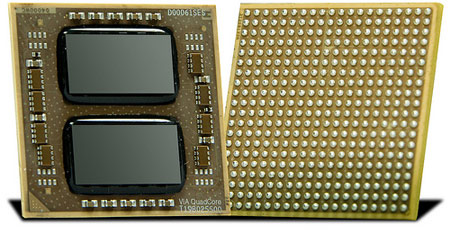
Each CPU “core” is actually a separate central processing unit, which is the part of the CPU that actually does the work. For example, a dual-core chip may look like a single CPU chip, but it actually has two physical central processing units on the chip.
Additional central processing units allow a computer to do multiple things at once. If you’ve ever used a single-core CPU and made the upgrade to a dual-core CPU, you should have noticed a significant difference in how responsive your computer is.
For example, let’s say you’re extracting an archive file and browsing the web at the same time. If you had a single-core CPU in your computer, web browsing wouldn’t be very responsive. The single core would have to split its time between web browsing and file-extraction tasks. If you had a dual-core CPU with two cores, one core would work on extracting the file while the other core did your web-browsing work. Web browsing would be much faster and more responsive.
Whether you’re doing multiple things at once or not, your computer is often doing system tasks in the background and you can benefit from additional cores to keep the operating system responsive. Applications can also be written to take advantage of multiple cores. For example, Google Chrome renders each website with a separate process. This allows Google Chrome to use different CPUs for different websites rather than using a single CPU for all browser-related tasks.
Image result for what is a core in cpu

Clock speed

Also called clock rate, the speed at which a microprocessorexecutes instructions. Every computer contains an internal clock that regulates the rate at which instructions are executed and synchronizes all the various computer components. The CPU requires a fixed number of clock ticks (or clock cycles) to execute each instruction. The faster the clock, the more instructions the CPU can execute per second.
Clock speeds are expressed in megahertz (MHz) or gigahertz ((GHz).
The internal architecture of a CPU has as much to do with a CPU's performance as the clock speed, so two CPUs with the same clock speed will not necessarily perform equally. Whereas an Intel 80286 microprocessor requires 20 cycles to multiply two numbers, an Intel 80486 or later processor can perform the same calculation in a single clock tick. (Note that clock tick here refers to the system's clock, which runs at 66 MHz for all PCs.) These newer processors, therefore, would be 20 times faster than the older processors even if their clock speeds were the same. In addition, some microprocessors are superscalar, which means that they can execute more than one instruction per clock cycle.

Clock Speed vs. Cores

CPUs have a clock speed – think of it as how fast the CPU does work. (That’s actually an imperfect analogy as the truth is a lot more complicated, but it will have to do for now.)
For example, Intel’s Core i5-3330 processor has a clock speed of 3 GHz and is a quad-core processor, which means it has four cores. All four cores in this Intel i5 processor are each running at 3 GHz.
Image result for Clock Speed vs. Cores

Dual Core, Quad Core & More

Phrases like “dual core,” “quad core,” and “octo core” all just refer to the number of cores a CPU has:
  • Dual Core: Two cores.
  • Quad Core: Four cores.
  • Hexa Core: Six cores.
  • Octo Core: Eight cores.
  • Deca Core: Ten cores.
Related image

Hyper-Threading

Intel CPUs use a technology referred to as “hyper-threading technology.” With hyper-threading, each physical core presents itself to the system as two logical cores. In the screenshot above, we’re not using an octo-core CPU – we’re using a quad-core CPU with hyper-threading.
This improves performance to some degree, but a quad-core CPU with hyper-threading is nowhere near as good as an octo-core CPU. You still only have four physical cores, although some tricks allow them to do a bit more work at once.
Have a question of your own about how technology works? Ask us on MakeUseOf Answers! This article was inspired by several good questions on MakeUseOf Answers.